Keep the project in the conversation.
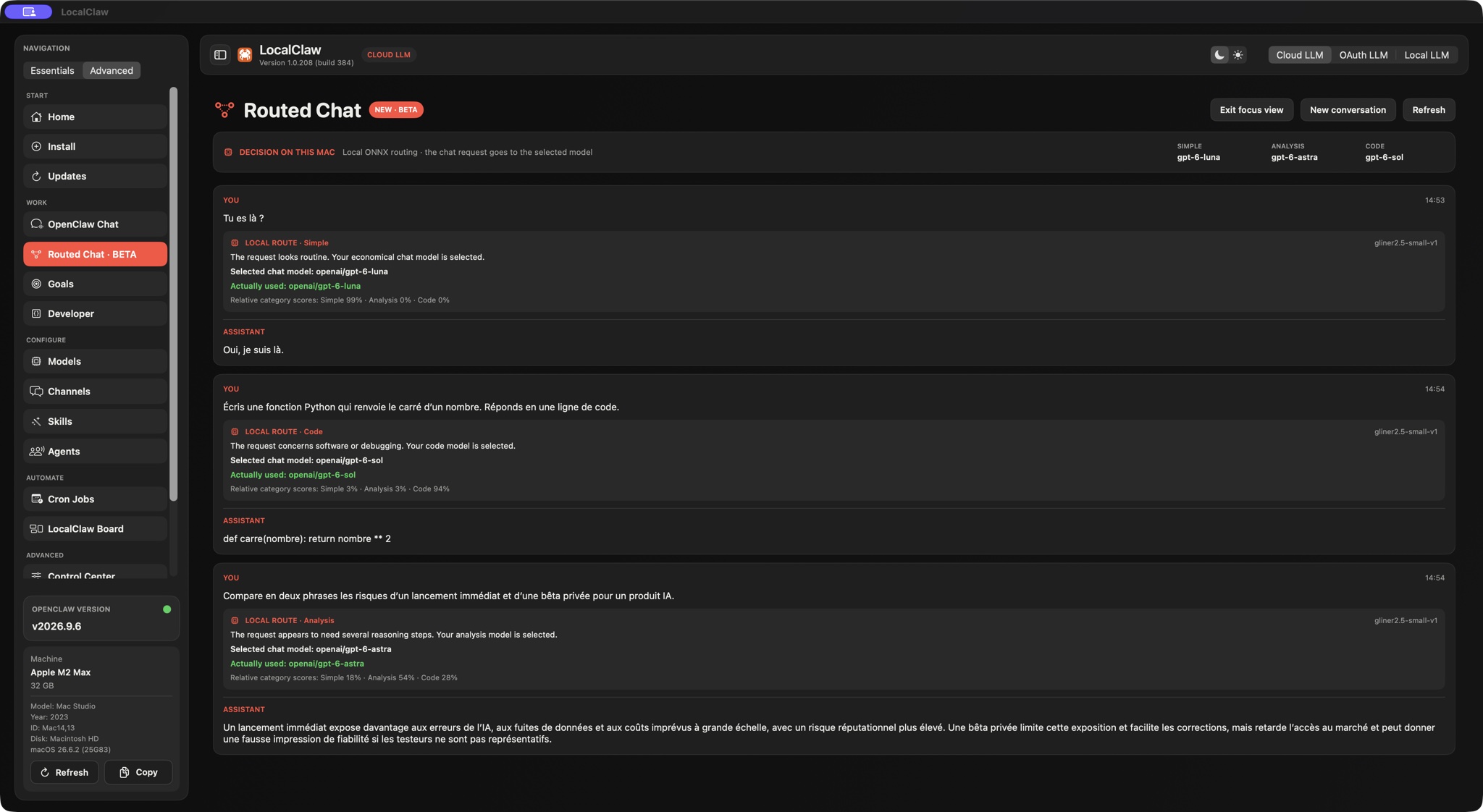
OpenClaw Chat keeps project memory and attachments close. The upcoming Routed Chat beta can also map Simple, Analysis and Code requests to different models.
 LocalClaw · The native app for macOS
Set up OpenClaw with guided checks, choose your models and start your first conversation. Then preview Routed Chat: local decision routing for Simple, Analysis and Code, coming in the 1.0.209 beta.
Apple Silicon only · macOS 13+ app · Apple-notarized DMG
Local models with LM Studio require macOS 14+.
Your license key appears after payment. Download the app and activate it with your order email and key. OpenClaw itself is free and open source; LocalClaw is the optional native Mac app.
See what your license includesRouted Chat uses a small ONNX decision model on your Mac to classify each request as Simple, Analysis or Code. LocalClaw applies your model map, then OpenClaw sends the complete prompt to the selected chat model.
A native SwiftUI workspace brings the practical controls together, from your first install to your next project.
OpenClaw Chat keeps project memory and attachments close. The upcoming Routed Chat beta can also map Simple, Analysis and Code requests to different models.
Developer workspaces, Git and GitHub actions, plus a local preview help connect a conversation to the project you are actually building.
Manage agents, connect channels, schedule cron jobs and organize Kanban tasks without scattering the controls across your workflow.
One payment for guided setup, model controls and conversations in a native Mac workspace. Your lifetime beta license includes LocalClaw app updates, with no LocalClaw subscription.
Secure Stripe checkout. Your license key appears after payment. No LocalClaw subscription.
OpenClaw is free and open source. Optional third-party models, cloud services and API usage may have separate costs.
LocalClaw gives OpenClaw a macOS control surface: setup, health, models, channels, agents and scheduled work in one place.
Gateway health, CPU/RAM, tokens, readiness and repair actions.
Switch between local, cloud and OAuth LLM modes cleanly.
Schedule OpenClaw jobs and see what runs, when and with which agent.
Create assistants, route work and keep model context visible.
Organize tasks across backlog, ready, doing, review and done.
Beta workspace tools for local chat, integrations and channels.
Use the open-source project directly, or choose LocalClaw for native setup and everyday controls. Our web model recommender and hardware guides stay free too.
Install and configure OpenClaw directly using the project’s documentation and tools. You do not need to buy LocalClaw to use OpenClaw 2.0.
Explore OpenClawGet the native control center with guided setup, activation, update flows, model operations and email support.
Get LocalClaw - $49LocalClaw 1.0.208 corrects Mac RAM reporting and improves process monitoring. It retains in-app updates and tested OpenClaw 2026.9.2 recovery, agents, models and Goals. The OpenClaw 2.0 highlights below remain part of the wider platform.
The new memory system is a headline OpenClaw 2.0 change, helping turn useful context into something your assistant can work with beyond a single conversation.
Searchable conversations and branching make it easier to revisit work and explore a different direction without losing the conversation that got you there.
Interactive widgets give OpenClaw a richer way to present information and actions. A useful next step for assistants that can turn a response into something you can interact with.
Explore the release’s local model direction, then use LocalClaw’s native model controls to configure LM Studio, cloud or OAuth modes for your own hardware and needs.
These are OpenClaw release highlights, not a promise that every upstream interface is built into LocalClaw. Availability depends on the OpenClaw runtime, interface, model provider and plugins. Experimental features, including Swarm, are not guaranteed in the native app. Read the official announcement.
The order matters: update the Mac app before upgrading the OpenClaw runtime.
Get the latest LocalClawOn 1.0.206 or earlier, install this Apple-notarized DMG in Applications one last time. Your saved license stays in place. From 1.0.207 onward, use App update → Update. Update all handles dependencies and OpenClaw first, then installs and relaunches LocalClaw last. Automatic replacement needs a writable Applications folder; if the shared folder is protected, install the app once in your personal ~/Applications folder.
LocalClaw checks the selected installation, coordinates Gateway maintenance and verifies recovery before reporting success. Plugin capability approval stays in your hands.
Review runtime health in Control Center and your selected model in Models. Keep a separate backup of project workspaces; LocalClaw’s runtime safeguards do not include them.
A native workspace for your next chapter with AI. $49 one-time beta lifetime access. No LocalClaw subscription.
